Reach a utility quickly.
Start utilities, make quick adjustments, configure shortcuts and recover from problems. Keep frequent actions easy to find and their status clear.
MAC HANDBOOK · BEHAVIOR AND EVIDENCE
Start a tool quickly, keep its controls close while you work, and prepare saved material in the desktop app. Each surface has a clear job.
The Mac release gate owns current delivery work. iPhone, iPad and Chrome extension development are paused. Earlier optional wallpaper proposals are retained as reference and add no prerequisite to the Mac release. The published download and its release notes identify the available package; the records below describe source behavior and specific test evidence.
THE THREE SURFACES
Start utilities, make quick adjustments, configure shortcuts and recover from problems. Keep frequent actions easy to find and their status clear.
Use the controls for the current workflow without leaving the task or disrupting a demonstration. Switching controls keeps independently running work intact.
Prepare scenes and personas, organise saved prompts, review captures and configure deeper settings. Saved work keeps the same owner whichever surface opens it.
The surfaces provide access to the same tools and saved work. Ending a job is explicit; changing the visible controls does not silently end another job.
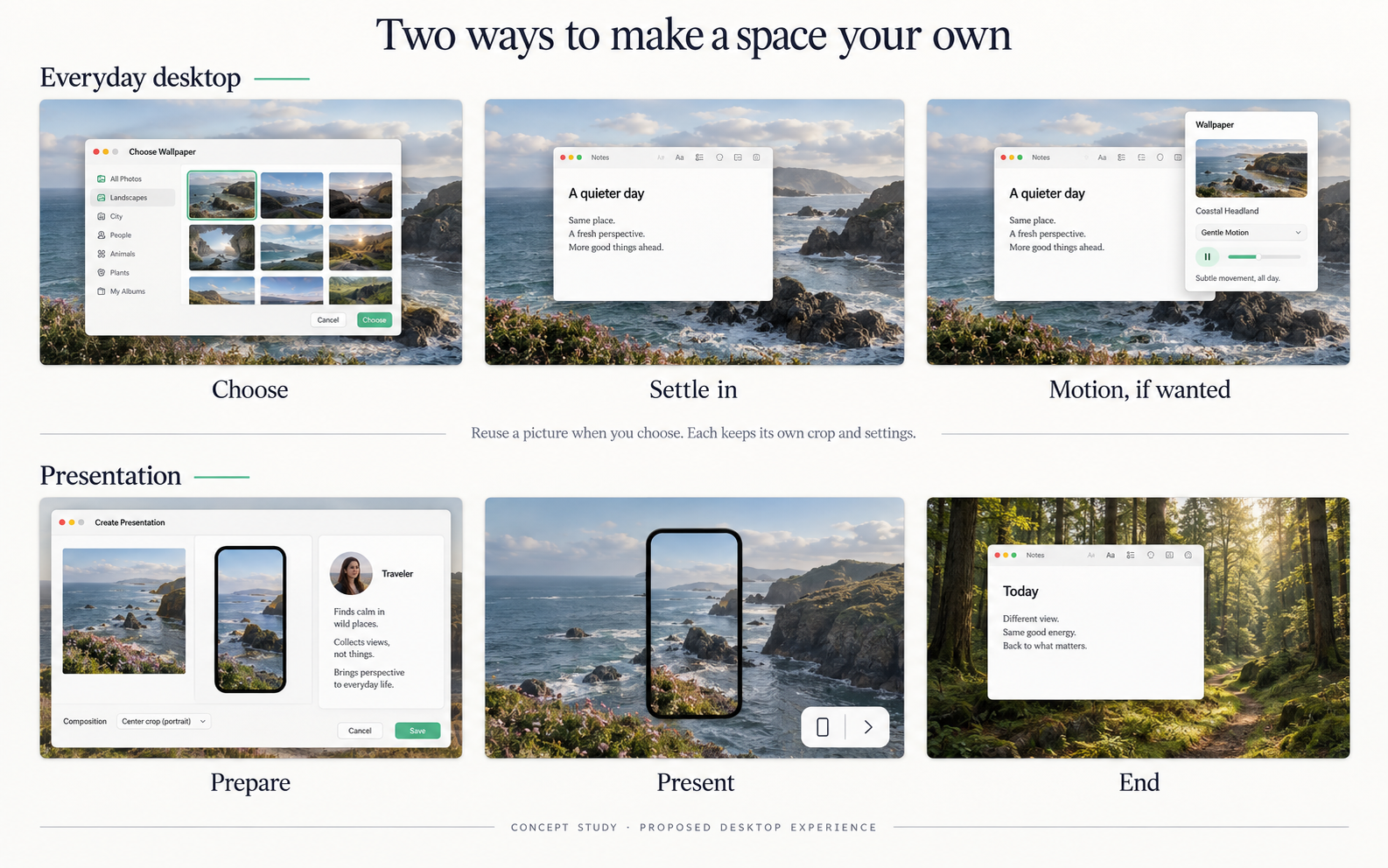
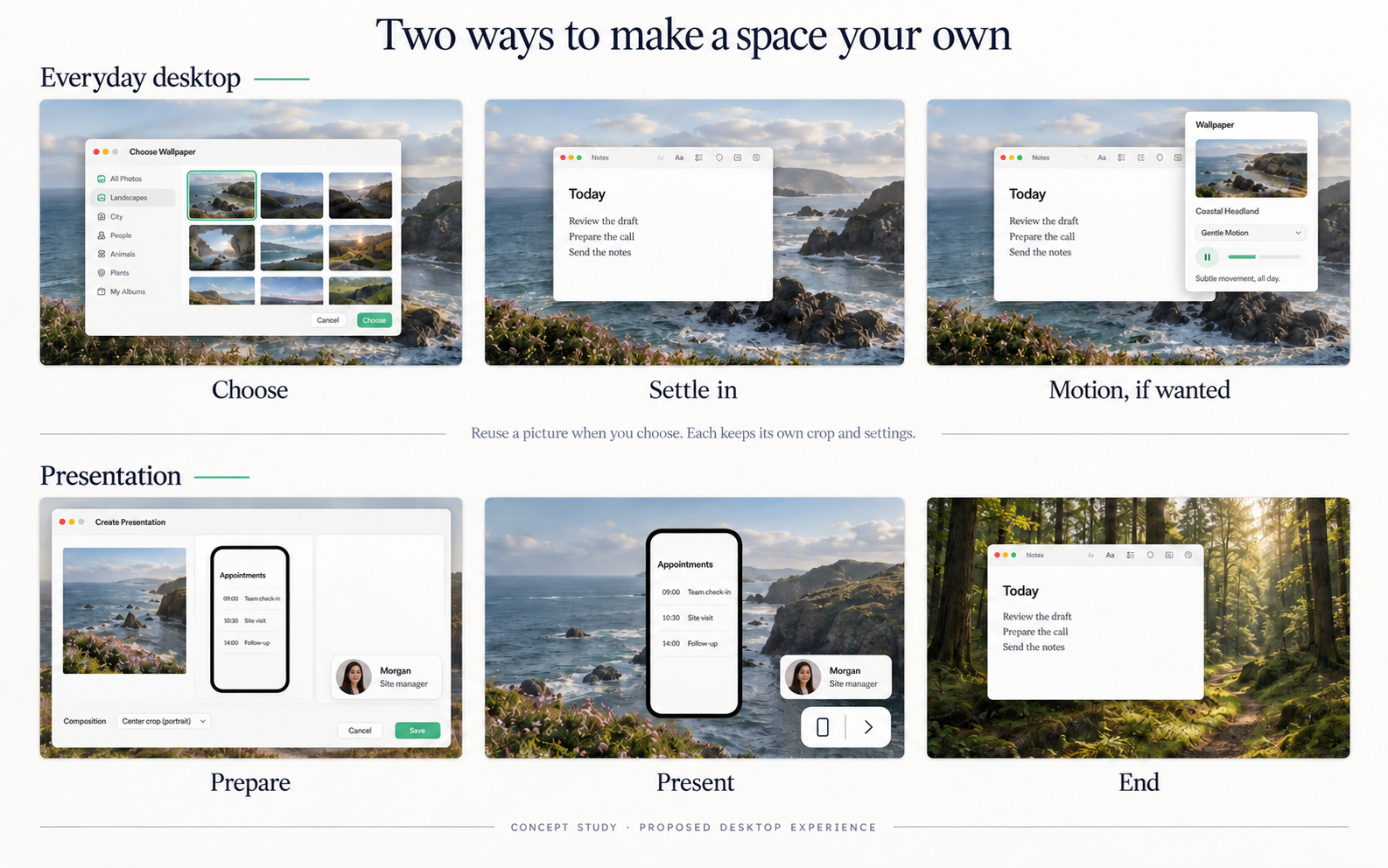
Earlier studies explored a direct wallpaper picker with independent settings. That entry remains proposed; existing still-desktop apply and recovery are recorded below. These studies are historical reference, not the next release task or instructions to replace the working editor.
CRAFT IS BEHAVIOR
Voice to Text, Annotate and Present remain direct entry points. Explain missing access or a disconnected device where it blocks the task.
Keep shortcuts predictable, Cancel dependable and recovery visible. Preserve the intended text destination and offer a clear copy fallback when it is no longer safe to insert.
Stop the selected job, retain saved work and preserve later manual desktop choices. Quit releases app-owned capture, playback and presentation resources.
Native interaction, saved-data preservation and the delivered package need their own evidence. A successful build, illustration or source review does not establish that a live workflow is reliable.
WHAT STAYS. WHAT ENDS.
Each job owns what it starts and stops. A presentation, desktop output, drawing and dictation can have independent lifecycles. Explore the recorded rules below. These buttons change this explanation only; they do not control your Mac.
The owned selector request or unsaved edit. A late capture result is discarded after cancellation.
Saved Snaps, original images, selections, existing narrated sections and independent jobs.
Escape produces no history record or Desktop file. Cancel an existing edit, reopen it and verify the prior crop/marks. Screen acquisition and clipboard results still require signed Preview checks.
| Event | Stops or changes | Keeps and checks |
|---|---|---|
| Cancel a Snap capture or edit Implemented | The owned selector request or unsaved edit. A late capture result is discarded after cancellation. | Saved Snaps, original images, selections, existing narrated sections and independent jobs. Escape produces no history record or Desktop file. Cancel an existing edit, reopen it and verify the prior crop/marks. Screen acquisition and clipboard results still require signed Preview checks. |
| Archive reviewed Snaps Implemented | Visibility in active Snap History through reversible metadata. A stale duplicate proposal is refused. | Stable IDs, original and rendered files, frozen running-job inputs and all portable Snap & Talk copies. Restore returns the same source. Repeated review does not propose already archived duplicates. Archive and exclude changes only the reviewed Snap references in the current selection; changing a saved selection requires Update. A named selection keeps its current review through explicit membership updates, failures and late completions. Assistant suggestions alone never apply cleanup. |
| End presentation Implemented | The presentation window, its controls and keep-awake activity. The shared device capture stops too, unless the Present page is on screen with a device scene, where the preview keeps showing the phone. | Saved scenes, original assets and any desktop picture applied by an earlier version. Do not restore wallpaper, close a meeting, move unrelated windows or change system Stage Manager settings. Check focus returns sensibly; do not promise an exact previous app is always restored. |
| Restore desktop Implemented | Use of Workbench’s still output on eligible matched displays, after macOS confirms restoration. | A later manual picture choice, unmatched recovery records and any active presentation. Read the current desktop before restoring. A recorded old URL is not authority to overwrite a later user choice. Only pictures applied by earlier versions remain to restore; the app no longer applies one. |
| Change a picture in System Settings Implemented | Nothing in Workbench; macOS owns the new choice. | A running presentation and saved compositions. Restoration subsequently skips pictures it no longer owns. Restore reads the current picture first and leaves a later manual choice alone. Workbench never reapplies a picture. |
| Quit Workbench Implemented | App-owned recording, playback, presentation, drawing, timers and monitors. | Saved work, retained desktop output files and recovery records. A still picture set through macOS remains set. A desktop picture applied by an earlier version stays set. Do not restart in the background or restore wallpaper silently. |
| Hide all overlays temporarily Implemented | Visibility of all current session artwork. The small tile remains available. | Prepared sets, frozen artwork and each copy's visibility choice. Changing sets while paused stays hidden. Show again restores the selected set without reviving copies individually hidden earlier. |
| End overlays Implemented | Every window and the control tile belonging to the overlay session. | Saved groups, layouts, original images, unrelated apps and the desktop picture. Live changes are temporary unless explicitly saved. Quit also ends the session; launch never restarts it. |
| Open an Apple app from Can’t see your phone? Implemented | Workbench’s capture of the phone, released on its own queue before the app opens. During a presentation the stage ends first: its window, controls and keep-awake activity. | Saved scenes and other apps. The capture stays released, and the status reads Let go for another app, until the person presses Present, reconnects or shows a screen; covering the window never takes it back. The Apple app owns its own device session; meeting sharing remains separate. From the page, the sheet closes and the capture’s stop completes before one open. During a presentation, capture release and window closure must both finish, in either order, before one app-open attempt. A visible launch error never silently reacquires capture. |
| Choose another tool or finish drawing Implemented | Changing the selected tool changes its controls only. Done drawing commits the active stroke or text and releases annotation input. | The live scene, saved ink and boards, and any ordinary dictation capture or narration remain independently owned. The menu offers each primary action directly with one click. Verify original-target delivery after drawing ends, copy fallback when focus changes, and no late paste after Quit. |
WHAT THE MAC PROVIDES
| Concern | macOS baseline | Workbench implication |
|---|---|---|
| Still wallpaper | Pictures, colors and image-positioning controls. | The public desktop-image API is the starting point for stills. Confirm the selected display and read back the result. |
| Dynamic and aerial | Time-of-day Dynamic Wallpapers and aerial lock/unlock/screen-saver behavior are distinct. | A still-image setter does not prove continuous-video, native aerial or schedule support. Test each type separately. |
| Displays and Spaces | Wallpaper settings include “Show on all Spaces.” Displays and Spaces are different scopes. | Current code targets the editor’s display or main display. A named display chooser and arbitrary Space control are not established. |
| Windows and attention | Mission Control and Stage Manager organize windows. The frontmost app receives keyboard input. | Wallpaper should stay behind work. A presentation can take focus deliberately; ending it must not rearrange unrelated windows or change system settings. |
| Sharing | The capturing app selects a window or display and may filter other windows. | Rendering the scene inside its own window is different from an overlay or desktop picture. Verify the recipient’s view in Teams and Zoom. |
Apple documentation was reviewed on 13 September 2026. Earlier native inspection covered Apple Wallpaper and Plash settings. No wallpaper was changed in this documentation increment; dynamic playback, energy and receiver behavior have not been benchmarked.
THE IMPLEMENTATION CONTRACT
The records below are generated from the same JSON contract available to contributors and agents. “Implemented” describes source and stated checks, not publication of the newest binary. “Proposed” preserves an earlier idea; it does not make that idea active work or a release prerequisite. “Retired” keeps the record of a capability removed from the app after use showed it was noise or never worked in practice, with its decision ledger. The Mac release gate determines current scope.
Entry: Snap → Region / Window / Screen; Add image → Paste or Import; Snap & Talk capture sources only after Experimental features is enabled
Crop and annotate an unsaved image, then Save or Save & Copy into canonical local Snap History. Search titles, notes, tags and image text, use the common selection, review exact duplicates and archive reversibly. Named selections retain one current review document through membership changes and synthesis, with immutable task replies and optional prior context. New Snap & Talk captures enter this history and portable sessions retain frozen copies.
Boundary: Cancel creates no empty item or Desktop file. Originals, earlier edits and portable session packs remain intact. Provider review shares the rendered crop by default. Suggested exclusions need review, and a late result cannot overwrite newer document edits. Live narration and full keyboard/small-display acceptance remain open. Manual Region, Window and Escape acceptance was reported passed; audio/receiver paths remain separate.
Evidence: The 66 synthetic Snap checks cover rendering, metadata revisions/size limits, immutable snapshots, reversible review, named result identity and portable composition. Signed Preview 9d4aff1 passed import/crop/annotation/copy, selection/search, named review and archive/restore. Signed 6f0f7a0 passed corrected saved-selection lifecycle, fractional-duration handoff and duplicate-safe saved-Snap composition; independent artifacts confirm preservation. Ethan reported manual Region, Window and Escape checks passed. The 30 September hover refinement passed 41 synthetic capture-choice checks, 120 Snap checks and 38 final production-toolbar host renders with zero flags; see docs/verification/2026-09-30-snap-hover/README.md for source and installed boundaries. New source selection, cancellation and narration transitions still need installed acceptance. Earlier limits remain in docs/releases/2026-09-27-capability-preview.md. No public release claim.
snap-history · Source owner
Entry: Present → Persona; existing source chooser → My Profile / Live Camera / saved persona; Home → My Profile
Show saved artwork immediately from its own workspace. Hide/resume retains a prepared arrangement and per-copy visibility; End releases live overlays. A scene keeps its own frozen persona binding. Optional React to my voice rings the shown persona, Live Camera's bubble or a prepared set's selected overlay, with dots that rise into bars while the presenter speaks, in a colour the presenter chooses. Home’s local My Profile references a saved Persona. Taking or choosing a photo opens an appearance draft; Use photo saves it. Photo replacement preserves the Persona identity, groups and artwork already used by scenes or shown copies.
Boundary: Mac screen-positioned artwork, not browser-tab attachment. React to my voice meters loudness only while its persona shows and records nothing; it owns no recording and adds no saved-library schema or app identity. Live browser/window persistence, click-through, physical display recovery and receiver behavior remain native checks. Taking a profile photo requests Camera access explicitly; no account, remote profile or automatic camera access is introduced. Native camera capture and denial remain separate acceptance checks.
Evidence: At a2b6513, 16 focused workspace/quick/control tests with 418 assertions passed, including parent rerun. Offscreen 620px and 834px workspace layouts were reviewed with synthetic artwork. Signed Preview 9d4aff1 passed combined navigation and Persona display/hide. Focus, click-through, physical display recovery and receiver checks remain open; see docs/releases/2026-09-27-capability-preview.md. React to my voice at 413a397: 11 focused tests (104 assertions); a signed Preview native check opened the microphone only while the ring was on and its persona showed, closed it within 3 ms of hide, off, the persona key and Quit, and kept recording beside Dictate, narration and meeting capture settings; see docs/verification/2026-09-28-persona-voice-ring.md. At bca3ecf, the integrated local suite passed 243 StageKit tests / 4,808 assertions, and the surface gallery passed 260 renders with zero flags. Signed Preview build 20260929121540 passed Home profile choose-photo and Cancel without changing Me. The final microphone probe received zero-valued audio while the lid was closed; speech response and camera capture remain unverified. See docs/verification/2026-09-29-mac-experience/README.md for the exact source, installed checks and limits. Overflow removal source and offscreen evidence is tracked in docs/verification/2026-09-30-pill-actions.md; combined installed acceptance remains pending.
persona-workspace · Source owner
Entry: Present → Persona → Live Camera; Choose Persona → Live Camera or My Profile
Show a mirrored camera in Persona’s movable, resizable circle. My Profile and Live Camera are one click apart in Choose Persona: the incoming picture takes the outgoing one’s place and size and fades in on top while the outgoing one stays whole until covered. With React to my voice on, the bubble has the same voice ring as a card. Centre Stage appears where the camera supports it, sharing macOS’s per-app switch, and Video Effects… opens macOS’s Video menu. Hide releases capture and keeps the place for Show Live Camera again; End, Quit and sleep release it. Existing artwork and prepared layouts remain intact. Every live Persona door follows the same camera visit.
Boundary: Local video preview only: no recording, saved photograph or network stream. The voice ring’s microphone measures loudness and pitch only while React to my voice is on and the bubble shows. Choosing a source starts nothing. A prepared overlay set owns the slot until End; a camera held by Present or another app is refused. Actual permission, camera, disconnect, movement and receiver behavior require installed acceptance.
Evidence: Source and synthetic lifecycle coverage added for #134 on 1 October 2026. On 8 October the voice ring, My Profile and Live Camera switching, Centre Stage gating and a ScreenCaptureKit read-back of the real windows (--persona-check) were added; see docs/research/2026-10-08-persona-live-camera-and-profile.md. The signed installed candidate and hardware acceptance are tracked separately in issue #134; this status is not a release claim.
persona-camera · Source owner
Entry: Present → scene heading Persona control, Scene options under the preview, and a fixed footer with Present and Options
Keep scene preparation and one Present button together. Options holds Start full screen, saved beside the scenes, and Export image…. The preview shows the phone live before Present is pressed, with its status and one next step inside the device frame and under the preview. Scene options folds the device frame and size, logo, backdrop zoom, device shape, position and hand away. A live presentation has its own controls bound to the running snapshot: Show presentation window, End presentation, full screen, window size and position, the phone status with its step, and Source only when more than one screen exists. Selecting a saved scene does not retarget them; read-only preparation does not disable them. Reusable prompts live in Library’s Saved Prompts control. Browser switching is paused in source under #283; its entries and runtime admission are closed while Library retains Copy link and explicit Open in default browser without changing saved profile metadata.
Boundary: The layout does not change device capture or the handoff to Apple apps, and opening QuickTime is not proof of a connection. Native keyboard, popover-to-sheet and small-window acceptance of the rebuilt footer and Scene options remain required.
Evidence: Rebuilt on 6 October 2026 (issue #276): source renders of the page with no phone, a phone on USB, two screens, video restricted and a narrow window are in docs/verification/2026-10-06-present-foundation/README.md; installed acceptance is pending. Earlier evidence covered the previous Full screen, Window and Connection & audio footer and does not carry over: at a2b6513 compact geometry checks passed and synthetic 620×650, 834×730 and 1085×780 layouts showed no clipped footer controls; signed Preview 9d4aff1 exercised those controls (docs/releases/2026-09-27-capability-preview.md, docs/verification/2026-09-30-pill-actions.md). Saved Prompts ownership was rechecked against foundation candidate 746d85f on 7 October 2026; the Library control reconciliation in docs/verification/2026-10-06-library-resources.md retains that update separately from the older layout evidence.
compact-present-preparation · Source owner
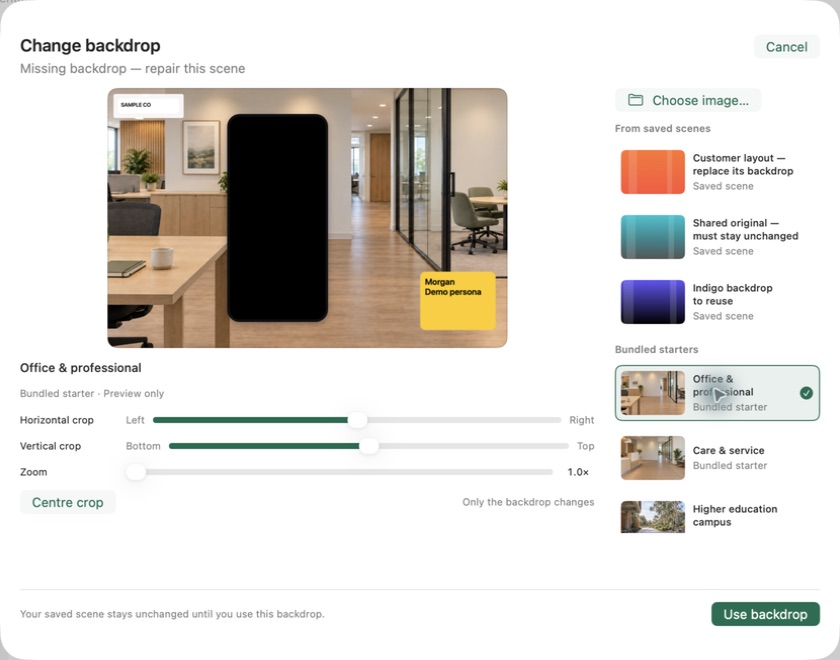
Entry: Present → Change backdrop…
Preview a file, starter or saved scene image with the retained foreground; apply only the background and crop. Library Resources can prepare a supported image through this same transaction, or explicitly create the first scene when no scenes exist. Cancel writes nothing.
Boundary: Changes the saved scene and later outputs, not a running presentation or an already-applied desktop image.
Evidence: Six focused tests with 126 assertions; native picker Cancel, Escape, Return Apply and missing-image repair checked with disposable scenes. Library image reuse passed 30 bounded-byte and export/reference checks plus three focused StageKit checks with 45 assertions covering preparation, cancellation, explicit first-scene creation and Persona frozen live copies with fake displays. Source and offscreen renders are separate from pending combined installed Preview acceptance.
scene-backdrop · Source owner
Entry: Present (a window by default; Options → Start full screen)
Show a saved composition in a Mac window or full screen. With the device frame on, the stage draws the same capture session as the Present page through its own preview layer, so a phone the page showed is already live. End stops that capture even with the Present page on screen; the page then reads Presentation ended until Present, Reconnect or a shown screen. Until the phone is live, the frame shows its status, detail, one next step and Can’t see your phone?. The compact controls use a phone icon when the device is enabled and a picture icon otherwise, and expand to the status, the step, Reconnect where it helps, Source when there is more than one screen, Position and End. Backdrops are still.
Boundary: A meeting app chooses what to share. Workbench sends no Mac input to the phone. An audience view, USB recovery, a second display and two preview layers on one phone session need their own checks.
Evidence: At da4f0f4, saved name/backdrop/persona edits left a running windowed still unchanged; End/restart adopted them. At 7e45213, the unchanged isolated native host verified all eight expanded positions, a compact-tile drag to Left centre, keyboard reveal and Escape collapse/End through a full-screen transition. Device capture and cloud were off; this is not receiver-view or installed signed-shell verification. The 6 October 2026 rebuild (shared capture, status in the frame, Source only with several screens) has source renders of the stage with no phone and with two screens in docs/verification/2026-10-06-present-foundation/README.md; it has not been installed or shown a phone on the page or the stage; headless receipts with an attached iPhone are recorded there.
scene-session · Source owner
Entry: Present page: the status inside the preview’s device frame and the row under it. Stage: the device frame and the edge controls. The Present menu in the menu-bar panel, the floating toolbar’s View and Home’s live row. Can’t see your phone? opens the help sheet.
One owner reads the USB bus (is an iPhone or iPad attached at all), the screen sources macOS offers (is its screen available: unlocked, trusted and allowed), the camera permission and the capture session’s phase, and gives every Present surface the same title, detail and one next step: Show the found device, Choose screen…, Reconnect, or Camera Settings… when access was refused. The one phone or tablet screen is shown and remembered without a choice, whatever plain cameras are also offered; a plain video device alone or two phone screens wait for one. End and a handoff to an Apple app both let go of the phone, whether or not the Present page is on screen: the status reads Presentation ended or Let go for another app, with Reconnect. Present, Reconnect or a shown screen takes it back; after End so does a fresh visit to the Present page or plugging the phone in again; a camera-permission answer, discovery change or frame that lands after End does nothing. A stall keeps the phone's last frame on the stage, and once the phone has appeared the stage's frame carries no words; the stage names devices by kind, never by the person's own device name. Another app interrupting the session reads as busy and recovers by itself; a disconnect found by the health check is said at once. A failed USB check reads Workbench couldn’t check USB, never No phone on USB. The help sheet adds three checks away from Workbench, a QuickTime check only while the picture is missing for a reason the Mac might explain (QuickTime is named as a cause only when macOS says another app holds the device), the ways to show the phone in a call without the stage, iPhone Mirroring where installed, and Copy connection details, which says Copied only when the pasteboard took the text. The same facts back the headless --phone-link receipt; both report devices by kind, never by name, with a capture error's domain and code but not its message.
Boundary: Video only: no phone microphone or audio, no Mac input to the phone and no recording. It reads no device-management policy and changes no setting; restricted access names IT. Opening QuickTime Player or iPhone Mirroring releases Workbench’s capture first. A remembered device that goes away is never replaced by another. Real phones, the accessory prompt, a managed Mac and meeting receivers need hardware acceptance.
Evidence: Tests/StageKitLegacy/PhoneLinkTests.swift covers every status phase with its words and next step, Reconnect and help on representative phases, the adoption rule, nouns without serials, USB classification, a seven-line diagnostic without identifiers or device names, a failed USB look kept apart from an empty bus (in the reducer and through the monitor's own callback, which also drops a look after it stopped), bounded capture faults, QuickTime named only for a busy device, and clipboard-dependent copy success; PhonePresentationTests.swift covers adoption, exact-device recovery and the handoff joins; PhoneOwnerTests.swift (PhoneEndTests) runs End through the real DemoScenes, DemoPresentation, DemoCapture and PhoneLinkMonitor with synthetic AVFoundation: a permission answered after End, frames in flight and after End, a late discovery change and a stale stage step all leave the capture stopped until Reconnect or Present. PhoneCaptureTests in the same file cover adoption beside a camera, Present and Reconnect after End trying at once, a disconnect found by the health check, a stall keeping the last frame, an interruption by another app and its recovery, the page's sixty-second grace, unchanged answers not republished, and the stage wired before the page's preview. Synthetic signals and hardware only. Source checked and rendered on 6 October 2026 and rechecked on 7 October 2026, with the StageKit runs recorded in docs/verification/2026-10-06-present-foundation/README.md. Not installed. Headless --phone-link receipts from signed scratch Previews with Ethan's iPhone attached to this Mac (6 and 7 October, recorded there) show the bus, the screen source and live frames; the picture on the page and the stage is still owed. See docs/phone-presenting.md.
phone-link · Source owner
Entry: Removed on 6 October 2026. Was: Present → More → Use as desktop (Preview build)
Render the whole scene to a retained PNG, record recovery information and request the desktop change through macOS.
Boundary: Includes foreground artwork; it is not a background-photo-only picker. Uses the editor window's display or the main display. No dedicated display chooser. Excluded from APP_STORE builds.
Evidence: Retired on 6 October 2026, as docs/research/2026-10-06-present-rebuild.md records, because a scene with a device frame and logo is a presentation picture rather than a wallpaper; Restore desktop stays for pictures applied earlier. Source verifies journal-before-write and URL readback; this documentation change did not alter the user's desktop.
desktop-still · Source owner
Entry: Restore desktop when recovery information exists
Restore recorded image/options only where the current picture still matches a Workbench-owned output.
Boundary: Retains unmatched recovery records. It is not a complete snapshot of Apple's dynamic, aerial, rotation, screen-saver or arbitrary Space configuration.
Evidence: Recovery planning has deterministic tests; multi-display and multi-Space behavior requires native validation.
desktop-restore · Source owner
Entry: A direct Wallpaper entry; final placement to be tested
Choose a picture, preview its fit on a named display and apply it. Keep a separate wallpaper preference and previous-picture recovery.
Boundary: No dedicated wallpaper manager exists yet. Do not introduce login launch, scheduling, a sidebar category or an asset migration merely to ship this first job.
Evidence: Next proof: a first-time user sets and restores a picture without opening a scene editor; another can use only Dictate without seeing wallpaper setup.
wallpaper-entry · Source owner
Entry: An explicit Use this picture action in the relevant picker
Reference the same original through two independent saved configurations. A still frame may accompany future motion assets.
Boundary: No live synchronization of crop or playback. Existing scene-image reuse is implemented; cross-job wallpaper reuse is not.
Evidence: Proof: edit, remove and export each configuration independently; preserve originals referenced by the other job or recovery.
asset-reuse · Source owner
Entry: Removed on 6 October 2026. Was: Present → More beside the presentation buttons → Use as animated desktop (non-App-Store build)
Apply and verify a rendered native still, then show an independent click-through desktop layer. Authored starters move clouds or foliage; ordinary photos use gentle zoom. Foreground artwork stays still. Pause/Resume/Stop controls appear in the scene window.
Boundary: App-owned, one display and the current Space only. Stops on Quit or Space change; checks native wallpaper ownership periodically. A direct photo-only wallpaper picker is still proposed. No video import, Lock Screen installation, automatic login restart or energy claim.
Evidence: Retired on 6 October 2026, as docs/research/2026-10-06-present-rebuild.md records, because the animated desktop never worked in practice; DesktopMotion.swift is removed. Native isolated Mac host checked desktop-layer Start/Pause/Resume/Stop and presentation-End independence without changing the user’s wallpaper. Ownership, nested sleep and removal policies passed unit checks. Actual native still apply is separately implemented; physical multi-display/Spaces and energy remain unverified. The signed Mac Preview at source 9fe7959 was installed and opened with existing scenes present; the new toggle and desktop menu action were confirmed. It is not notarized or in the public download. The authored starter increment at 48c00dc is installed as signed local Preview build 20260914180524; exact archive/resource identity and new gallery verified. Not notarized or in the public download.
wallpaper-motion · Source owner
Entry: Removed from the Mac app on 6 October 2026. Was: Choose a starter → Window light, Campus breeze or Coastal sky; Gentle motion in scene settings; Pause/Play in presentation controls or the iOS editor preview.
For ordinary photos, an optional 3.5% zoom. Three authored starters instead move clouds or branches while the architecture and foreground remain still. Complete posters, clean plates and details travel in version 2 packages; the prior library manifest is preserved before upgrade.
Boundary: The visible active Mac editor previews enabled motion, with Play/Pause and a reason when paused. Drag, layout controls and sheets pause it. Galleries remain still. iOS animates only the active visible scene preview. PNG/Photos exports stay still; no Live Photo export or continuous iOS Home Screen animation. Reduce Motion, disabled animated-image autoplay, low power and high thermal state suppress animation. Device video and meeting receivers need separate validation.
Evidence: Retired on 6 October 2026, as docs/research/2026-10-06-present-rebuild.md records: the Mac never requests motion, the three starters make still scenes and saved motion fields still load. 79 native Mac scene tests / 2251 assertions and 72 shared-module tests passed. Actual isolated Mac office captures changed only the window sky; fixed room/desk pixels were identical. Native compositor and UIKit poster parity checked for all three rigs. See /scenes/ambient/ for the current source and delivery evidence.
scene-motion · Source owner
Entry: Overlay cards → Arrange overlays → Demo groups → Start overlays
Show several independently placed cards. The floating pill offers frozen Choose Set and Next set; its chooser hides, resumes or ends the session. Persona’s workspace and menu-bar Options retain per-copy Appearance, size, position, lock, replace/update, visibility, add/remove, front/back and explicit layout saving. Live images, labels and allowed choices are frozen. Removing a live copy does not remove its saved persona.
Boundary: Mac screen-positioned windows, not browser-tab attachments or captured-app composition. Up to 8 sets / 8 copies each / 32 prepared personas / 256 MB rendered imagery. Three editable single-persona shortcuts default on; the five multi-overlay session actions remain opt-in. No new cloud service or scene schema. Whole-display receiver checks remain separate.
Evidence: 88 integrated native Mac scene tests /2367 assertions and 114 StageKit CI-mode tests /2533 assertions passed (live menu-bar popover check excluded). Native keyboard focus and click menu, per-card hide, paused set switching, return and restoration checked with disposable artwork. Signed local Preview 20260914204356 installed; signature, preparation entry and disabled optional shortcuts verified. Source and delivery limits are in /personas/. Overflow removal source and offscreen evidence is tracked in docs/verification/2026-09-30-pill-actions.md; combined installed acceptance remains pending.
persona-session · Source owner
Entry: Timer → drag or Position
Snap on drag release; persist a free normalized position or one of eight anchors and recover on an available display after hiding, closing or restarting.
Boundary: Countdown and presentation remain independent. Corrupt, future or concurrently changed placement files are preserved. Physical display removal, VoiceOver and meeting receivers remain acceptance checks.
Evidence: Focused synthetic persistence checks: 19 assertions. Native AppKit timer hide/reopen and release-time snapping: 11 assertions. See docs/verification/2026-09-20-contribution-integration.md for combined-candidate results.
break-timer-placement · Source owner
Entry: Menu bar primary actions, native Draw menu, contextual floating toolbar and its activity chooser, or configured hotkeys
Choose controls without ending running work. The compact menus expose direct actions and configured shortcuts. Native annotation tools refresh on opening; Done drawing retains ink and boards. Failed audio-only capture can be kept in Saved recordings while starting fresh. A saved transcript waits while drawing owns input, then revalidates its original Mac target; Copy now completes without ending drawing. Explicit clipboard capture also works without a Mac field during presentation.
Boundary: No Mac input is forwarded to a phone. Final insertion, screenshot acquisition, export, shortcut practice and shutdown keep their input guards. Shared history supplies metadata, saved selections and reviewed handoff without a separate Notes store. Real microphone/device/receiver coexistence requires hardware acceptance.
Evidence: Host action-state and delivery-gate checks; exact AppModel capture-method tests with injected input/output; focused StageKit drawing tests; disposable native sizing and light/dark view renders. See the scoped acceptance record. Overflow removal source and offscreen evidence is tracked in docs/verification/2026-09-30-pill-actions.md; combined installed acceptance remains pending.
continuous-presentation-controls · Source owner
Keep these state boundaries when fixing existing workflows. The proposed wallpaper record is retained for context; existing desktop output and recovery remain with their current owner.
HUMANS, AGENTS AND DEVELOPERS
Use the working guide. Tell us what you expected, what happened and which version you used. A screenshot of made-up content is enough to start; diagnosis is optional.
Prepare an observation →Choose an agreed gap in the Mac release gate, state the user outcome and inspect its current source owner. Use the capability records as evidence and limits, not as a new backlog. Require the actual result and checks.
Read the agent brief →Follow the contribution guide and source map. Change one state owner at a time and attach the checks that establish the claim.
Open pull requests →This is a readable product contract, not an automation API. Workbench does not currently expose wallpaper through a CLI, App Intent or MCP server. A contributor must inspect available interfaces and stay within the user’s authorization.
Earlier reviews compared wallpaper and presentation journeys. Their useful constraints remain in the records above: preserve original media and manual desktop choices, keep jobs independent, and end app-owned capture and windows on Quit. Optional new wallpaper surfaces remain paused. Model agreement and generated concepts are not native acceptance evidence.